LaserBox Pro Issues
XTool Support Link
Hardware Abnormal Error Code Diagnosis please click this link - Error Codes Diagnosis Link
Sample on basic troubleshooting of thehardware before asking for assistance.
Error Code: Qx020
Basic information confirming
1.SN number which pasted on the back of laserbox.
2.Go to Setting-help-check for updates to see if your software is latest version
3.Connect with your laserbox with laserbox software, and go to setting-Device-Firmware to check if firmware is latest version,it’s better to share an image for this interface.
Clean Air faucet
1.Form below image we can see inside the air faucet there is a circle buckle to stuck the air-tube (rubber tube), when press down the surface then you can remove the Air-tube, same method to plug the Air-tube in.
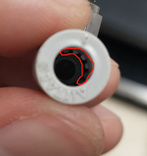
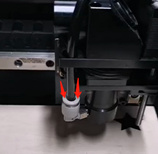
2.Once you removed the air faucet, then you can clean the Air faucet, because if anything has been blocked inside of Air faucet, it will occur that error Qx020 as well.
3.After cleaned the Air faucet, but the error still exist, then it maybe something issue with air pump.
For further support
Pls send below information to xtool support vicky@xtool.com
1.When and where did you buy the laserbox machine?
2.SN number which pasted on the back of laserbox.
3.Is the LaserBox can work properly before this error occur?