React-Native Setup
When using React-Native CLI
---------------------------
Step to run Android Studio
- $ cd /home/archer/Application/android-studio/bin
- $ ./studio.sh
Step to execute the sample project
1. Terminal 1
- $ cd /home/archer/AwesomeProjecto
- $ npm start
Note: Wait until the android simulator app will show
2. Terminal 2 (in same path)
- $ npm run android
Note: Wait until the sample application "AwsomeProjecto" will be loaded inside the simulator.
When using Expo CLI (Framework that set on-top of React-Native)
---------------------------------------------------------------
$ npx create-expo-app company_payments-example
$ cd company_payments-example
We will using VScode as editor
------------------------------
$ code .
Notes: Helpful extensions are
1. React Native Tools -> for debugging
2. Expo Tools -> Expo VS Code for debugging (easy debugging)
2. React-Native/React/Redux snippets -> shortcut generating codes
3. Prettier - Code formatter
4. Material Icon Theme -> great icons for project.
To run the project in the VS code View > Terminal
-------------------------------------------------
$ npm start
Press a │ open Android
*Pre-requisite when open an Android: Make sure you already have Android Studio and created Mobile Virtual Device. Follow the standard installation. Make sure you also configured the ~/.bashrc and execute in your terminal "source ~/.bashrc" to update your user environment.
Build React Native Library
Following:
https://mcro.tech/blog/how-to-create-react-native-wrappers-for-native-sdks/
https://medium.com/mobile-learning/build-react-native-library-by-create-react-native-library-da64ad6e391a
PS C:\React\sample\sample_project_reactnative_sdk_wrapper> npx create-react-native-library company-sdk
Need to install the following packages:
create-react-native-library@0.31.1
Ok to proceed? (y) y
√ What is the name of the npm package? ... react-native-company-sdk
√ What is the description for the package? ... Company Payment React SDK Wrapper
√ What is the name of package author? ... yourname here
√ What is the email address for the package author? ... support@company.com
√ What is the URL for the package author? ... https://www.company.com
√ What is the URL for the repository? ... https://svn.company.com
√ What type of library do you want to develop? » JavaScript library
✔ Project created successfully at sample-sdk!
Get started with the project:
$ yarn
Run the example app on iOS:
$ yarn example ios
Run the example app on Android:
$ yarn example android
Run the example app on Web:
$ yarn example web
DOM Iterate using for loop
Sample for-loop iteration with classic JavaScript.
var items = document.getElementsByClassName("MyClassName");
for (var i in items) {
    items[i].style="display:block;";
    items[i].className="";
}
Magento 2.4.x in Ubuntu 20.04 - Requirements & Installation guide
Guide for installing Magento 2.4.x in Ubuntu 20.04
Check the requirements using this link
https://www.mageplaza.com/kb/
For installing PHP please follow this link:
Magento 2 - cluster_block_exception [TOO_MANY_REQUEST/12/disk usage exceeded flood-sate watermark, index has read-only-allow-delete block]
Elasticsearch problem - Cluster Block Exception
I experienced this issue "cluster_block_exception" when I did a DI compilation and other during re-indexing.
/*di compile command*/
bin/magento setup:di:compile
/*re-indexing command*/
bin/magento indexer:reindexIdentify on what region the object is created
Using C++ we will identify the memory region of an object by declaring a new variable and compare this variable from the object that we wanted to identify. If the address of an object is in close proximity to the new variable then they are in the same region. This solution is accurate only for non multi threaded system or large project as I only assume 1000 bytes or 250 pointer variables gap from the new variable to the object we are comparing.
class ObjectDiagnostic {
public:
   static int obj_alive;
   ObjectDiagnostic(string name) {
      ++obj_alive;
      std::cout << "Name: " << name << " located in " << getMemLocation() << std::endl;
   }
   const char* getMemLocation() {
        int* p = new int(1); //heap variable
        const char* memAlloc = "HEAP";
        if (((&p - (void*)this) * -1) < 1000) {
            memAlloc = "STACK";
        }
        return memAlloc;
   }
}

int main() {
    ObjectDiagnostic() objD = ObjectDiagnostic("objD"); //stack object
    ObjectDiagnostic() *objD2 = new ObjectDiagnostic("objD2"); //heap object
}
The most accurate one is to use the assembly and access the current stack pointer.
asm("mov %%rsp, %0" : "=rm" (stackpointer))and use that as the reference rather than declaring a variable as reference.
Reverse
C++ Using STL reverse
int main(int argc, char *argv[])
{
    int a[] = { 4, 5, 6, 7 };
    std::cout << "Int Array" << endl << "original: ";
    for (auto e : a) std::cout << e;
    std::cout << endl;

    std::cout << "reverse: ";
    std::reverse(std::begin(a), std::end(a));
    for (auto e : a) std::cout << e;
    std::cout << endl;

    std::string name = "DRAGON";
    std::cout << "String" << endl << "original: " << name << endl;
    std::reverse(std::begin(name), std::end(name));
    std::cout << "reverse: ";
    for (auto e : name) std::cout << e;
    std::cout << endl;

    int* ip;
    int n = 9;
    ip = &n;
    std::cout << "Pointer Values" << endl << "original: " << ip << endl;
    std::stringstream ss;
    ss << ip;
    std::string address = ss.str();

    std::reverse(std::begin(address), std::end(address));
    std::cout << "reverse: ";
    for (auto e : address) std::cout << e;
    std::cout << endl;

    return 0;
}
Output:
Int Array
original: 4567
reverse: 7654
String
original: DRAGON
reverse: NOGARD
Pointer Values
original: 0115FB40
reverse: 04BF5110Cross Site Scripting Explained
Please click this link below to give you the basic idea about this type of security attack on the websites.
Entity Framework Core in Docker
Entity Framework Core in Docker Connecting to standalone Database
Solution:
Use mcr.microsoft.com/dotnet/core/aspnet:3.1-bionic instead of
mcr.microsoft.com/dotnet/core/aspnet:3.1-buster-slim
Link reference: https://github.com/dotnet/SqlClient/issues/222
Entity Framework Core in Docker Connecting to containerize database
Solution can be found in the link below:
Link reference: https://www.c-sharpcorner.com/article/entity-framework-core-with-sql-server-in-docker-container/
Using MariaDB with ASP.NET Core 2.0
Solution can be found in the link below:
https://www.jerriepelser.com/blog/using-mariadb-with-aspnet-core/
Resolving SSL/TLS Connections Problems with IIS Express
Running SSL in localhost while debugging with Visual Studio 2017+ guide.
OAuth 2.0 Authorization Grant Types
The OAuth 2.0 Authorization Framework specification defines four flows to get an Access Token. These flows are called grant types. To decide which one is suited for your case depends mostly on the type of application. This section will provide you the overview of the flow.
Javascript Object Creation Patterns
JavaScript has a multitude of styles for creating objects. But despite the variety and how different the syntax for each may look, they’re more similar than you probably realize.
Check if element is visible in the viewport
If you notice that your website is a little bit boring then maybe a little animation might help to make certain elements do a little fading or animation as it comes visible in the viewport.
Finding the percentage between two values
To find a percentage of a certain value between range (ex. Min=23 & Max=95) then use the formula below.
z = ((n - min) * 100) / (max - min)Detect your mouse scroll direction
To determine the mouse scroll event like scroll-up or scroll-down, we need a little bit of JavaScript to accomplish the task.
Printing an Object or Array elements
This is an example function that will print an object or array elements in your own logger.
/**
     * Debugging to log an object or array
     *
     * @param array $var
     * @param int $depth
     * @param int $currentLevel
     */
    public function printrLimited($var, $depth = 2, $currentLevel = 0)
    {
        if ($currentLevel > $depth) {
            return;
        }
        if (is_array($var) || is_object($var)) {
            foreach ($var as $key => $value) {
                if (is_array($value) || is_object($value)) {
                    continue;
                }
                $this->logger->info(str_repeat(' ', $currentLevel * 4) . "$key => " . $value);
            }
        }
    }
Hobby Referrences
How to Study a Stamp's Paper
Magento Docker Compose YML
Magento Docker Compose:
Execute the command in your CLI: docker compose up
version: '2'
services:
  mariadb:
    image: docker.io/bitnami/mariadb:10.4
    environment:
      # ALLOW_EMPTY_PASSWORD is recommended only for development.
      - ALLOW_EMPTY_PASSWORD=yes
      - MARIADB_USER=bn_magento
      - MARIADB_DATABASE=bitnami_magento
    volumes:
      - 'mariadb_data:/bitnami/mariadb'
  magento:
    image: docker.io/bitnami/magento:2
    ports:
      - '80:8080'
      - '443:8443'
    environment:
      - MAGENTO_HOST=localhost
      - MAGENTO_DATABASE_HOST=mariadb
      - MAGENTO_DATABASE_PORT_NUMBER=3306
      - MAGENTO_DATABASE_USER=bn_magento
      - MAGENTO_DATABASE_NAME=bitnami_magento
      - ELASTICSEARCH_HOST=elasticsearch
      - ELASTICSEARCH_PORT_NUMBER=9200
      # ALLOW_EMPTY_PASSWORD is recommended only for development.
      - ALLOW_EMPTY_PASSWORD=yes
    volumes:
      - 'magento_data:/bitnami/magento'
    depends_on:
      - mariadb
      - elasticsearch
  elasticsearch:
    image: docker.io/bitnami/elasticsearch:7
    volumes:
      - 'elasticsearch_data:/bitnami/elasticsearch/data'
volumes:
  mariadb_data:
    driver: local
  magento_data:
    driver: local
  elasticsearch_data:
driver: localReference vs Address
What is the difference between reference and address in C?
An address is a number that corresponds to a place in memory.
A reference is a name that refers to an existing object, rather than being it's own object.
What makes them different?
int x;
int & r = x;
Explained:
int x = 7 ; // x is an object of type int
// x has an address (of type pointer to int)
// an object is a region of storage that has a size, a type, and a lifetime
// this object was created by the definition of the variable x of type int

int& r = x ; // r is a variable, but it is not an object
// the variable r refers to (is an alias for) the the object x.
// r has no address of its own; and it may not occupy any storage at all
// r is an alias for x, and &r yields the address of x
// (references are not objects; we can't have arrays of references)
// (references are not objects; we can't use new to allocate a reference)

int* p = &x ; // p is an object of type pointer to int (initialised with the address of x)
// p is an object; it has an address of type pointer (pointer to int)
// p is a region of storage that has a size, a type, and a lifetime
// this object was created by the definition of the variable of type pointer to int
How about this?
int myfun();
int & myfun();
Explained:
With int myfun();, the expression myfun() yields a prvalue (a pure rvalue).
A prvalue either identifies a temporary object or, as in this example, a value that is not associated with any object.
With int& myfun();, the expression myfun() yields an lvalue.
That lvalue identifies a non-temporary object of type int.
int fn1() { return 67 ; } // fine
int fn2() { int i = 6 ; return i ; } // fine.
// the lifetime of the local objct i is over once the function returns.
// but we are not returning the object i; we are returning a prvalue initialised with i

int& fn3() { return 67 ; } // *** error: 67 is not an lvalue
int& fn4() { int i = 6 ; return i ; } // *** logical error:  we are returning an lvalue
// but the lifetime of the local objct i is over once the function returns.

int& fn5() { static int i = 6 ; return i ; } // fine: lifetime of i extends beyond the return

fn1() = 23 ; // *** error: can't assign to rvalue
fn5() = 23 ; // fine: assign to lvalue ( assign to static int i in fn5() ) LaserBox Pro Issues
XTool Support Link
Hardware Abnormal Error Code Diagnosis please click this link - Error Codes Diagnosis Link
Sample on basic troubleshooting of thehardware before asking for assistance.
Error Code: Qx020
Basic information confirming
1.SN number which pasted on the back of laserbox.
2.Go to Setting-help-check for updates to see if your software is latest version
3.Connect with your laserbox with laserbox software, and go to setting-Device-Firmware to check if firmware is latest version,it’s better to share an image for this interface.
Clean Air faucet
1.Form below image we can see inside the air faucet there is a circle buckle to stuck the air-tube (rubber tube), when press down the surface then you can remove the Air-tube, same method to plug the Air-tube in.
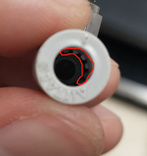
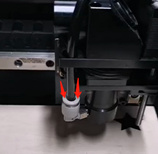
2.Once you removed the air faucet, then you can clean the Air faucet, because if anything has been blocked inside of Air faucet, it will occur that error Qx020 as well.
3.After cleaned the Air faucet, but the error still exist, then it maybe something issue with air pump.
For further support
Pls send below information to xtool support vicky@xtool.com
1.When and where did you buy the laserbox machine?
2.SN number which pasted on the back of laserbox.
3.Is the LaserBox can work properly before this error occur?
How to optimize your website
First of all you have to check if your website requires optimization through PageSpeed Insights by Google.